Units are parts of the company. They are usually departments or a services within the company.
Since they correspond to sub-budgets, their setup is optional.
When you specify opening balances in the setup of the budget exercise, setting up units enables the determination of a percentage of opening balance to assign to each unit.
Info
Setting up units is only possible if the company on which they depend, has already been set up.
 Accessing Setup Page for Units
In the Modules Tasks pane, click Units in the Setup folder of the Liquidity module.
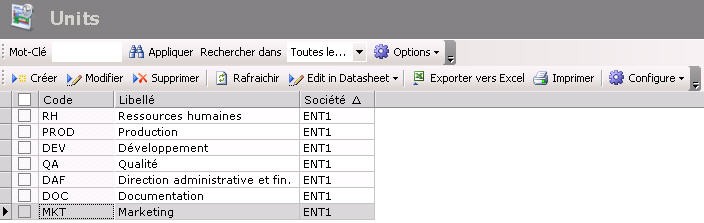
The setup page for units is displayed with the list of the set up units in a table.
The table specifies the code and description for the unit, as well as the company on which it depends.
For more information on:
- Reorganization of the lines display in the table, click here
- how to search text in the table, click here
- how to create lines, see the topic below,
- modifying lines in the table, click here
- deleting lines in the table, click here
You can change the layout of the table: columns display, filtering on selection criteria, lines grouping according to criteria, etc. For more information on this feature, see topic Table Reorganization.
Creating Units
Info
To create units, you need to first create the company on which they will depend.
For more information on the creation of entities, see topic Company.
- In the Actions toolbar in the setup page for units, click the Create button.
The creation page for units is displayed.
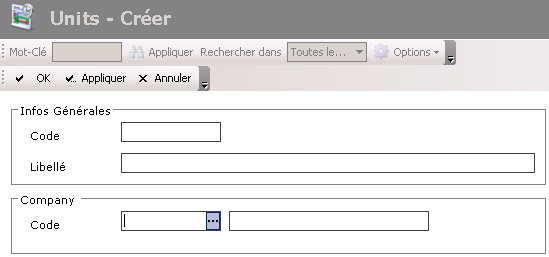
- In the General Info area, enter a code and a description for the unit.
It cannot be modified later. - In the Code field of the Company area, click
 to select the company on which the unit depends.
A contextual window displays the list of units.
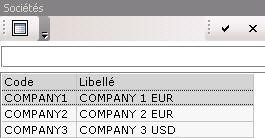
- Double-click a line to select it.
The code and description of the company are displayed in the Company area in the creation page for units. - Click the following buttons, as needed:
- Apply to save the setup of the unit and create another one,
- OK to save the setup of the unit and redisplay the list of the set up units,
- Cancel to cancel the setup of the unit


